


AI lead generation is a process of applying artificial intelligence to automate every step of the workflow. Thousands of big companies are using AI automation for their lead generation process. AI lead generation reduces the investment of time, employees, and workload. Alongside it, AI automation qualifies leads 24/7, improves the accuracy of data, updates your CRM systems in real time, and offers many more advantages.
Let’s learn together about what AI is for lead generation, how you can use AI in this process, a hybrid model, a relevant prompt for it, etc.
What Is AI for Lead Generation?
AI for lead generation means using AI such as machine learning, NLP (Natural Language Processing), and automation in the process to identify, attract, and qualify potential customers. They help to find, attract, score, and convert potential customers with minimum manual effort.
Traditional lead generation depends on manual research and outreach. But using AI for lead generation keeps the work continuous in the background. It identifies high-potential prospects, personalizes communication, and feeds qualified leads directly into your CRM.
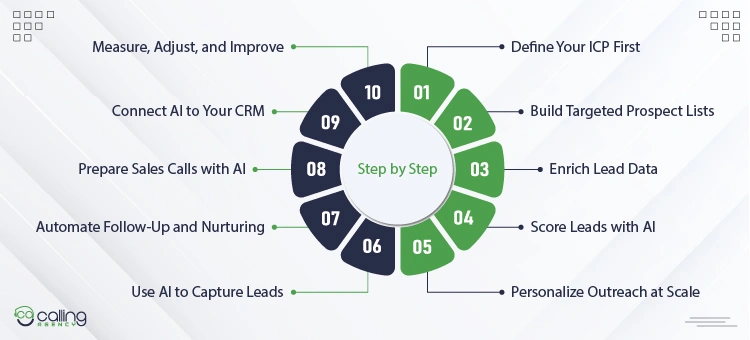
How to Use AI for Lead Generation: Step by Step
AI-powered lead generation can be very effective, only when you follow a complete process. Random use will not be effective but drain your interest. Let’s discuss how you can use AI applications and tools for lead generation.
Step 1: Define Your Ideal Customer Profile First
Defining your ideal customer profile is knowing to whom you want to sell your product or service. Let’s assume you offer a cold calling service. Now you can go to a generative AI such as Gemini, Copilot, ChatGPT, Claude, etc., whatever you use, and ask who you are, your ICP from your desired location, and explain the service also. AI will give you an exact answer, and it will reduce the time from manual research.
AI vs Manual process of defining ideal customer profile:
| Manual process | AI-assisted ICP |
| You need 2 to 6 weeks of workshop, alignment, and revision cycles. | You can do it within hours. |
| Sources are the team’s memory, the spreadsheet, etc. | CRM, call transcripts, win/loss data, G2 reviews, social media signals, etc. |
Prompt sample:
You are a B2B positioning strategist. Define the Ideal Customer Profile (ICP) for this business:
- Business: {{Name & one-line description}}
- Product/Service: {{What they sell}}
- Best customers: {{2-3 examples or descriptors}}
- Core problem solved: {{Main pain point}}
Output format:
- Who they are (industry, size, stage, business model)
- Who buys (title, KPIs, top pain points)
- What triggers a purchase
- Who to disqualify
- One-paragraph ICP summary
Be specific and no vague descriptors.
Step 2: Build Targeted Prospect Lists
To build a targeted prospect list using AI, you need to connect your ICP (ideal customer profile) to AI tools or an automated data workflow. AI can research and refine a list from millions of mixed and cold data. To do it, you can follow a simple process.
Set up an AI workflow engine: Copying data from LinkedIn or other platforms manually is time-consuming. You can use AI tools like Clay, Apollo, or Seamless. They automate the list-building process by pulling data from different sources.
Define AI data signal (input): You don’t need to search for industries because AI tools do it for you. They find specific buying signals and show that the company might need your help.
The most important signals are:
- Technographic
- Hiring Triggers
- Growth signal
AI tools find information about specific companies using software, they find hiring signals, and also which companies are growing recently.
Use AI to clean and categorize data: You can simply tell the AI to clean and categorize the data. Specify the format of file type you want, and the tools will provide exactly what you want.
Deploy AI waterfall enrichment: AI waterfall enrichment verifies your prospects’ contact numbers, email addresses, or other information automatically from different sources and databases.
Prompt:
Act as a Lead Generation Engineer. I need to build a targeted prospect list.
- My product is: {{Insert Product/Service}}
- My Target Decision-Maker is: {{Insert Job Title, for example, VP of Sales}}
Give me a step-by-step workflow to build a list of 500 high-intent prospects.
Include:
- What specific search filters should you use on LinkedIn Sales Navigator or Apollo?
- Two unique “AI data signals” (like specific keywords on their website or hiring changes) to filter out bad fits.
- How to use an AI prompt to clean the company names for personalized outreach.
Step 3: Enrich Lead Data
Lead enrichment with AI involves finding accurate data, verifying it, and completing missing fields of your prospect list using AI.
- Technographic
- Firmographic
- Demographics
- Intent data
The four types of data that get fixed or improved in this stage with the help of AI. There are different tools available in the market that can do this job for you. Lead enrichment is a bridge between a raw contact list and an accurate lead list.
Just upload your dataset, and AI (Clay or a generic LLM like Gemini, ChatGPT API, or Claude) will automatically make a refined list to hand off for scoring. For this, you need to give a prompt.
Prompt:
You are a B2B lead enrichment specialist. Enrich the leads below using public data.
Leads: {{Paste lead list here}}
For each lead, fill in:
- Industry, headcount, revenue range, business model, growth stage
- Key tools/tech stack
- Buying signals (funding, hiring, recent news)
- Decision-maker title and seniority
Output as a table. Flag data gaps as {{Needs review}}.
Step 4: Score Leads with AI
AI lead scoring is a process of assigning a number or numeric value based on each prospect’s possibility of converting into a customer. Using AI, you don’t need to analyze one by one prospects’ profiles and assign value to them.
Put the data sheet into AI tools, and it will analyze the prospects’ demographics or firmographic data like job title, industry, company size, or location. It will also find out negative attributes that reduce the conversion chances. This is how lead scoring in the process of lead generation has become easier and smoother.
Prompt:
You are a B2B lead scoring specialist. Score the enriched leads below against the ICP provided.
- ICP: {{Paste ICP here}}
- Enriched leads: {{Paste enriched lead list here}}
For each lead, score across these criteria:
- Firmographic fit (industry, size, stage)
- Technographic fit (tools/stack alignment)
- Decision-maker fit (title, seniority, tenure)
- Buying signals (funding, hiring, news)
Assign each lead:
- Score: 1 to 10
- Tier: Hot / Warm / Cold
- Priority action: Contact now / Nurture / Disqualify
One-line reason, then output as a table and sort by score from highest to lowest.
Step 5: Personalize Outreach at Scale
Personalizing outreach messages using AI is super effective and easy. Once you place the prompt to the AI asking to generate an outreach message, for example, LinkedIn prospecting, the LLM analyzes the prospect’s profile and gives a perfect and personalized message. So the prospect feels that you have some preparation, and you can mitigate their pain points.
You can generate contextual AI copy and implement multi-channel reach messaging,
such as:
Prompt:
You are a B2B outreach specialist. Write personalized cold outreach messages for the leads below.
- ICP & value proposition: {{Paste here}}
- Outreach channel: {{Email / LinkedIn / Cold call script}}
- Tone: {{Direct / Consultative / Challenger}}
- Leads: {{Paste scored lead list here}}
For each lead, write a personalized message using:
- Their specific buying signal or trigger (funding, hiring, news)
- Their pain point mapped to our solution
- A clear, low-friction CTA
Rules:
- 3 to 5 sentences max
- No generic openers (I hope this finds you well)
- No feature dumps
- One CTA per message
Output one message per lead in a table with columns: Lead name | Company | Channel | Message | CTA
Step 6: Use AI Chatbots to Capture Website Leads
Using AI chatbots on websites lets you capture leads 24/7 because your customer support agent might not be active 24 hours, but they are always active. Those bots reply to all generic and common questions, and some advanced bots answer all types of complex questions, too. So your lead capturing stays active always.
Using AI chatbots directly helps you in 4 ways:
- Proactive visitors engagement
- Conversational lead qualification
- Automated scheduling and routing
- Direct CRM integration
So this is how you can use AI chatbots in your lead generation process.
Step 7: Automate Follow-Up and Nurturing
Automating the follow-up and nurturing reduces manual outreach time and also engages the prospect on time immediately because AI agents reply to them on your behalf. To do this, set your AI workflow and let it draft, time, and route every message.
Set up your follow-up triggers: Pick the actions that start a sequence. A filled form, an opened email, a watched video, and a second visit to your pricing page. Each trigger maps to its own message track, so the lead gets a reply that fits what they just did.
Use NLP to write contextual sequences: The AI reads past replies and writes the next email to match. It pulls the lead’s industry, role, and pain point, then drafts a message that sounds like a real conversation instead of a template.
Turn on smart intent detection: AI separates a real objection from noise. “Too expensive” triggers a value-based reply. An out-of-office auto-note gets held, not answered. This stops your sequence from talking to an empty inbox.
Deploy omnichannel triggers: A lead goes quiet on email, so the system switches channels. It drops a voicemail, sends an SMS, or fires a LinkedIn message instead of emailing into silence.
Insert dynamic content: The lead mentions a problem, and the system pulls a matching case study or proof point. The right industry, the right result, dropped into the next message automatically.
Prompt 1:
Act as a Sales Engagement Engineer. I need to build an automated follow-up sequence.
- My product is: {{Insert Product/Service}}
- My Target Decision-Maker is: {{Insert Job Title, for example, VP of Sales}}
- My trigger event is: {{Insert Trigger, for example, downloaded a case study}}
Give me a 5-touch follow-up sequence across email, SMS, and LinkedIn. Include:
- The exact timing for each touch (Day 1, Day 3, and so on) and which channel to use.
- A short, conversational copy draft for each touch that references the trigger event.
- Two intent signals in a reply that should route the lead to a human rep immediately.
- One break-up message to send if the lead stays silent through the full sequence.
You can also run a second prompt to handle replies as they come in. This one sorts intent and drafts the response.
Prompt 2:
Act as my SDR assistant. I will paste a prospect’s reply below.
My product is: {{Insert Product/Service}}
The prospect’s reply is: {{Paste Reply}}
Do three things:
- Label the reply as one of: real objection, question, not interested, or auto-reply.
- If it is a real objection or question, draft a short, direct response that moves the conversation forward.
- If it signals buying intent, flag it for a human and tell me why in one line.
Step 8: Prepare Sales Calls with AI
Prepare for sales calls with AI by automating the research, building pre-call briefs, and running roleplay drills. You walk into every call with talking points built for that one buyer.
1. Automate Pre-Call Research
Manual research eats hours. AI builds an account profile in seconds.
Use intelligence tools. AI platforms generate a one-page cheat sheet on the prospect’s pain points, recent press, and competitor pressure. Prompt an LLM. Feed it the company website and ask for a tight summary.
Prompt:
Act as an enterprise sales rep. Based on this URL {{Insert URL}}, do three things:
- Summarize their core business in three sentences.
- List three pain points they likely face in {{Insert Industry}}.
- Suggest one sharp question I should ask the {{Insert Job Title}}.
2. Run AI Roleplay Simulations
Practice the hard questions before the real call, not during it.
- Simulate the buyer. Use a built-in or custom AI roleplay agent.
- Pitch against a persona. Tell the AI to act as a skeptical buyer and drill your pitch and objection handling until it holds up.
Prompt:
Act as a {{Insert Buyer Persona, for example, skeptical CTO}}. I am selling {{Insert Product/Service}}.
Run a roleplay call with me. Do this:
- Open with a real objection this persona would raise.
- Push back on my answers the way a tough buyer would.
- After the roleplay, score my responses and tell me where I lost you.
3. Build Decision Trees
Map where the call might go before it goes there.
- Draft variations: Write your main message in plain words, then write two or three natural ways to say it.
- Map the objections: Ask AI for the happy-path reply plus the confused and the angry versions of the prospect, so you know your next line either way.
Prompt:
Act as a sales call strategist. I am selling {{Insert Product/Service}} to a {{Insert Job Title}}.
Build me a decision tree for the call. Include:
- My core pitch in plain words, plus two natural variations.
- The three most likely objections this role raises.
- A happy-path response, a confused-prospect response, and an upset-prospect response for each.
4. Add Real-Time Coaching
Run conversation Intelligence software during the live call. Use live prompts. Tools like {{Insert CI Tool, for example, Avoma}} show reference cards on your screen with answers to objections as they land.
Step 9: Connect AI to Your CRM
You can connect your CRM to an AI tool in two different ways.
Using your CRM’s native AI: If you are using platforms like Salesforce Einstein, HubSpot Breeze AI, or Zoho Zia, you can simply set the settings of your CRM and set those features.
Connecting 3rd party AI tools through integration: If your CRM does not have built-in AI features, you need to connect external AI tools like Gemini, ChatGPT, or Claude using middleware like Zapier or direct API keys.
Step 10: Measure, Adjust, and Improve
The last step is easy. You look at what works. You fix what does not. You make it better next time. Here is how.
Measure. Use tools like Google Analytics and your CRM. They show you the numbers. How many people came? How many of you opened your email? How many clicked? Look at each page. Find the one that brings the most leads. Find the one that brings the least.
Adjust. Now make a test. Try two things and see which one wins. Change just one part, like the title. AI looks at the results. It tells you which one is better. You keep that one. You drop the other.
Improve. Put what you learned back in. AI does the hard math for you. So you spend less time looking at data. You spend more time doing the work. Each time, it gets a little better.
The Human+AI Operating Model: What to Automate, What to Keep Human
AI is fast and tireless, but it can make mistakes. So, it is seen that a lot of giant lead generation service providers are adopting a hybrid model combining AI and humans. The teams that win do not hand the whole pipeline to a bot, and they do not grind through it by hand either. They split the work by what each side does best.
The rule is simple. AI handles volume, speed, and pattern. Humans handle judgment, trust, and the moments that close deals. Let’s see which work should be automated, and which should not.
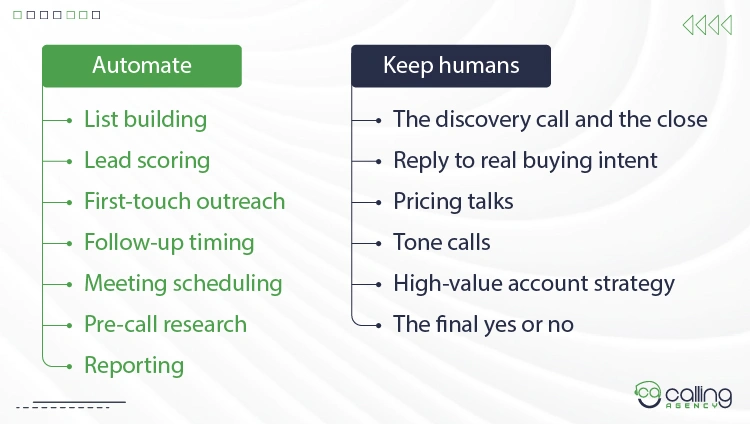
Automate the high-volume, low-judgment work:
- List building and data enrichment
- Lead scoring and routing
- First-touch outreach at scale
- Follow-up timing and channel switching
- Meeting scheduling and reminders
- Pre-call research and brief building
- Reporting and pattern analysis
Keep humans on the work that needs judgment:
- The discovery call and the close
- Any reply that signals real buying intent
- Pricing talks and contract terms
- Tone calls on sensitive or angry responses
- High-value account strategy
- The final yes or no on a qualified lead
A clean way to think about it: AI gets the right message to the right person at the right time. The human decides what happens once that person replies. AI fills the top of the funnel and clears the busywork. People carry the deal across the line.
If you are depending completely on AI automation, you are going to face a lot of issues with inaccuracies and more. On the other hand, if you are depending on a complete traditional process, you are way behind the times. The best decision is to pick a model that works by combining both and outputs the best.
Conclusion
AI does not replace your sales process, but it removes the manual and repetitive work from the process. Such as the research, the tracking, the follow-up, and the reporting. All the work that used to consume your reps’ hours, by the grace of AI tools, now those tasks run in the background, so your team spends its time on conversations that move revenue.
Companies that adopt AI into their lead generation process will stay ahead. This is not because AI is a kind of magic, it’s because they free their employees from repetitive work and lets them brainstorm on deal closing or other productive tasks.
Frequently Asked Questions (FAQs)
What is the difference between AI lead generation and traditional lead generation?
AI lead generation is a process of applying artificial intelligence to automate every step of the workflow. Where traditional lead generation requires manual research, lead scoring, qualification, outreach, and follow-up. The difference between AI lead generation and traditional lead generation is mainly that AI tools are used and things are done manually, as clear as that.
How much does AI lead generation cost?
AI lead generation cost can be different according to agency, the tools you use, and location. The average cost can be $30 to $1000 if you do it yourself. But if you go to an agency for complete lead generation and appointment setting service, it might cost $1000 to $5000 on average.
What kind of business is AI lead generation best for?
AI lead generation is best for B2B companies, high-value service providers, and consultancies/agencies. The most common business types that use AI lead generation are B2B SaaS, real estate, legal agencies, healthcare, logistics, and more.
Do I need technical skills to set up an AI lead generation workstation?
No, you don’t need technical coding or complex skills to set up a workstation to generate leads using AI tools. The integration is very simple; if you are in DIY, you can just watch a demo video or explore the options of your CRM, and you can do it easily. But if you hire a lead gen agency, they will do everything for you.
How long before AI lead generation shows results?
You can expect to see an initial qualified lead after 14 to 30 days of launching your campaign. But the return on investment and scalable results take a bit longer. It can take 60 to 90 days to provide you with an ROI.
How accurate is AI lead data?
The accuracy if AI lead generation data depends on several things. Most of the AI tools verify data from different tools and provides you with email accuracy between 80% to 90% for the top tools. Phone number has lower accuracy. So always run a verification before outreaching a prospect.
Is AI lead generation legal, and is my data safe?
Yes. AI lead generation is legal but has some restrictions. Generally, using AI in your lead generation process is not unlawful, but you must strictly follow consumer privacy laws like GDPR, CCPA, etc., and you should avoid deceptive advertising, and you should respect the do-not-call or email list.
What are the risks, like spam flags or platform bans, in AI lead generation?
AI lead generation carries big risks, such as sender reputation, instant problem bans, and legal penalties. If you depend on AI completely without human verification, then it can trigger an anti-bot algorithm on platforms like LinkedIn or Meta. Also, bulk emailing with generative can also make your domain blacklisted permanently.