

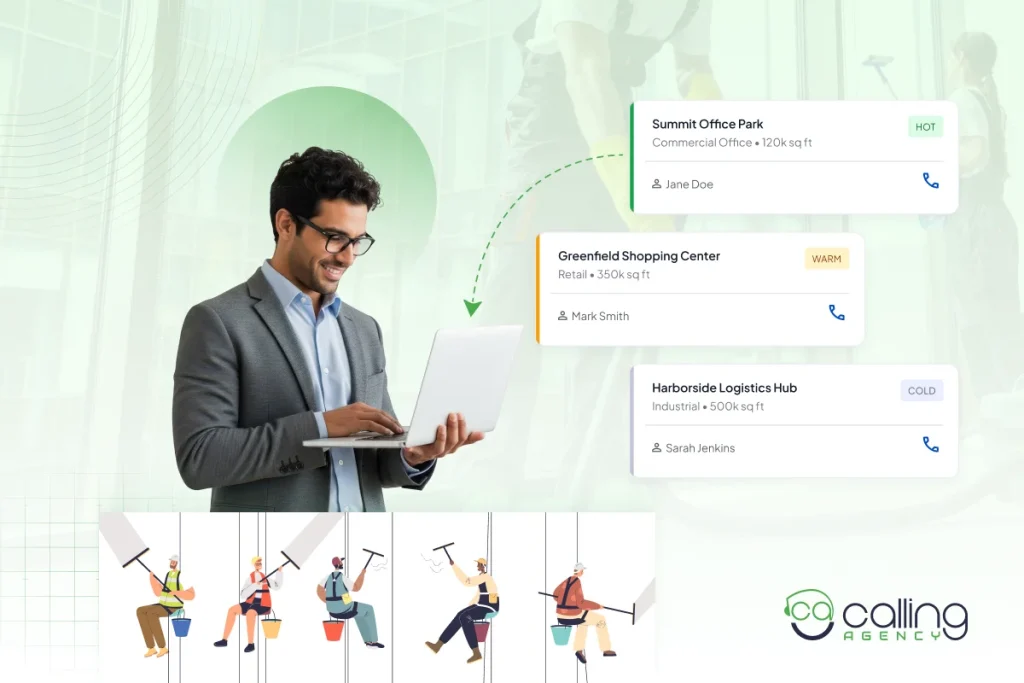
Building a commercial cleaning prospect list can be challenging because most businesses already have a cleaning provider. They usually consider switching around contract renewals or after service problems.
That’s why you also need to reach the right person. Cleaning decisions may involve facility managers, property managers, or procurement teams.
So, to build a commercial cleaning prospect list, start with the types of businesses most likely to need your services, then filter them by location, property type, company size, decision-maker, and cleaning needs.
Because a useful list should provide your SDRs with more than just names and phone numbers. It should show who to contact, why the account fits and what to say across cold calls, email and LinkedIn. A targeted commercial cleaning lead generation strategy can help turn that prospect data into a more actionable pipeline.
| Note: A Prospect List Is Not a Lead List
A lead has raised a hand. You can get it from content marketing or any networking events. On the other hand, a prospect has not heard from you yet. Your list is the input. Leads are the output. That difference changes how you judge the file. A lead list gets judged on interest. A prospect list gets judged on fit and reachability. Each row must answer 2 questions.
|
How to Build a Commercial Cleaning Prospect List?
Here is how we build a commercial cleaning prospect list:
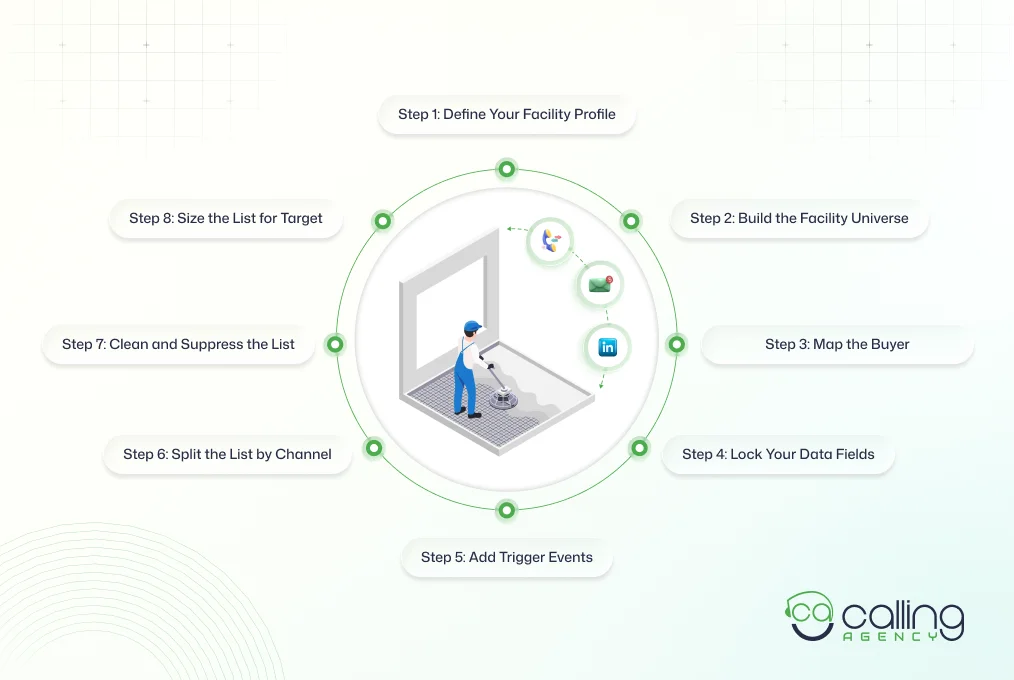
Step 1: Define the Facility Profile You Can Service
Before you start collecting contacts, define what a good commercial cleaning account looks like for your business. These 6 filters will help you narrow the list:
- Cleanable square footage: Focus on the space your crew will actually clean instead of the building’s total listed size.
- Drive time: Measure travel time from your crew base. Traffic can affect labor costs more than straight-line distance.
- Service frequency: Check if the facility requires nightly cleaning, weekly service, a day porter or three visits per week.
- Floor mix: Carpet, polished concrete, VCT, and terrazzo all have different labor times and equipment needs.
- Access requirements: Check for after-hours entry, badges, escorts and dock access before adding the account.
- Minimum contract value: Set your minimum monthly billing upfront. If an account falls below it, remove it from the list before spending time on a walkthrough.
Once these filters are clear, match them with the facility types you want to target. Here is how it looks:
| Facility type | Typical cleanable size | Usual scope | Why it fits or does not |
| Corporate and multi-tenant office | 5,000 to 50,000 sq ft | Nightly janitorial, common areas, restrooms | Predictable hours, annual agreements, easy to route |
| Medical and dental clinic | 2,000 to 10,000 sq ft | Disinfection protocol, exam room turns, waste handling | Higher rate per square foot, needs documented procedures |
| School and childcare | 10,000 to 100,000 sq ft | Term contract, summer deep clean, gym and cafeteria | Formal bid cycles, slow to win, slow to lose |
| Industrial and warehouse | 20,000 sq ft and up | Floor scrubbing, restroom volume, break rooms | Equipment heavy, thin margin if you underbid the floors |
| Retail, gym, restaurant | 1,500 to 15,000 sq ft | Day porter, high traffic restrooms, closing clean | Fast decisions, high churn, price sensitive |
| Post construction | Project based | Rough, final and touch-up cleanup | One-time revenue that can convert to recurring |
Step 2: Build the Facility Universe Before the Contact List
Start at the building level, as a single property can yield multiple prospects. A managed office building, for example, may have several tenants and they need cleaning services plus a property manager responsible for the common areas.
That’s why start by mapping your service area with 20, 30 and 45-minute drive time zones around your operations base.
Also, calculating drive time matters more than straight-line distance. Because traffic directly affects crew hours, travel costs and an account’s profitability. Keep properties outside the 45-minute zone in a separate list instead of mixing them with your primary prospects.
Then build your facility database from several sources:
- County assessor and property records
- Building permits and certificates of occupancy
- State and city business license databases
- Google Maps
- Commercial real estate listings
- BOMA, IREM and IFMA directories
- Directories of chambers of commerce and local business publications
When you build the list, write down the property and the people related to it.
Capture the facility address, property type, estimated size, tenant or company name and property management company. Then list down relevant decision makers such as facility managers, property managers, operations managers and procurement contacts.
Remember they aren’t like B2B decision makers. So, don’t skip the property management company just because you’re targeting a tenant.
One management company may control cleaning contracts across several buildings. It can turn one researched property into multiple potential opportunities.
Step 3: Map the Buyer for Each Facility Type
Mapping the buyer means identifying the person who can influence, approve or manage a commercial cleaning contract for each facility. The right contact changes by building type, size and ownership structure. So, you need to know who actually controls the buying decision before you start outreach.
For example, the buyer for a medical office might be a Practice Manager, while a large office building may use a Property Manager or Facility Manager. A warehouse could put the decision with an Operations Manager.
We usually start with the facility type, then identify the likely decision maker and any other people involved in the purchase. Build those contacts into your prospect list instead of adding only one generic business contact
Here is an example of a buyer map:
| Facility | Primary title | Secondary title | Gatekeeper |
| Single tenant office | Office Manager | Operations Manager | Front desk |
| Multi-tenant or managed property | Property Manager | Regional Property Manager | Assistant Property Manager |
| Corporate campus | Facility Manager | Director of Facilities | Executive assistant |
| Medical and dental | Practice Manager | Clinic Administrator | Front office lead |
| School or district | Director of Operations | Business Manager | Superintendent office |
| Industrial and warehouse | Plant Manager | EHS or Maintenance Manager | Receptionist |
| Retail, gym, restaurant | Owner | General Manager | Shift supervisor |
This matters because calling the wrong person can waste the opportunity.
You may contact an office manager who has no authority over the contract, whereas the property manager does. Mapping the buyer helps your SDR reach the right person faster and make it more relevant to their interests.
Portfolio property managers deserve their own tier because a single relationship can span several buildings. Give these contacts a separate priority level and tailor your outreach around the number of properties they manage.
If your supervisors can’t consistently protect time for prospecting each week, this is also where outsourcing b2b lead generation can make sense. Your team stays focused on service delivery while an outside team handles prospecting and appointment setting.
Step 4: Lock Your Data Fields Before You Collect a Row
Locking your data fields means deciding exactly what information every prospect record must contain before you start building the list. This keeps your database consistent and makes it useful for cold calls, email, LinkedIn Sales Navigator and CRM follow-up.
A company name and phone number aren’t enough.
You need enough information to qualify the account, find the right buyer, personalize outreach and decide what happens next. So, to do it correctly, create your columns first, then start collecting prospects.
Divide the fields into 3 groups:
Account fields tell you what the facility looks like and whether it fits your ICP:
- Company name and facility address
- Facility type and estimated cleanable square footage
- Number of floors and employee count
- Property management company and building owner
- Drive time zone
- Current cleaning vendor, if known and the source of relevant information
Contact fields tell your SDR who to reach and how to reach them:
- First and last name
- Exact job title and department
- Direct dial, mobile or landline and switchboard number
- Verified email and verification status
- LinkedIn profile and connection status
Campaign fields help you manage outreach instead of letting good prospects disappear:
- Assigned channel and priority tier
- Trigger event and trigger date
- Suppression status
- Last touch and outcome
- Next action date
Step 5: Add Trigger Events So Every Call Has a Reason
A trigger event gives you a timely reason to contact a prospect. It means you don’t need to call every company with the same cleaning pitch. Look for a recent change that could create a new need or make the company reconsider its current vendor.
We have seen a few commercial triggers such as-
- New lease signed or tenant move-in
- Certificate of occupancy issued on new or renovated space
- Building sold or the property management company changed
- Expansion, an added floor or a second location
- Post-construction handover, which often converts into a recurring contract
- Public bid or RFP posted by a school district, city or county
- New facility manager, operations director or office manager hired
- Downsizing or consolidation, which usually forces a re-bid of the cleaning contract
Contract timing is another strong signal. If a prospect tells you their cleaning contract renews annually and requires 30–60 days’ notice, save the notice month in your CRM. Start outreach around 90 days before the notice date, while the company still has time to evaluate another provider.
This gives your SDR a reason for the call instead of a pitch.
Step 6: Split the List by Channel
The same list should not go to all three channels at once. Route each record by what you actually have on it, for example:
| Record condition | First channel | How to work it |
| Verified direct dial and the title matches a signer | Cold call | Highest intent path. Call first, email as the follow-up. |
| Verified work email, no phone | Short sequence tied to the trigger event. | |
| No email and no phone, active LinkedIn profile | Connect with context, then message. No pitch on the invite. | |
| Mobile number only | Manual dial only | Never load into an autodialer. See Step 7. |
| Portfolio property manager | LinkedIn plus email | Do not cold call the leasing line. Reach the PM directly. |
| Switchboard only | Research queue | Not ready. Find the named contact before it costs you a dial. |
But don’t rely on a single contact at a building.
Try to reach 2/3 relevant people because the first person you speak with may influence the decision but not control the cleaning contract.
Start with engaged people such as the property manager, facility manager, operations manager or procurement contact. Before doing so, give your SDRs a clear structure for each channel:
- Cold calls: Use a commercial cleaning script to keep the conversation focused and consistent.
- LinkedIn: Reach property Facilities Managers and other contacts who may be harder to reach by phone with the right script.
- Email: Build short sequences around the trigger event you found earlier, such as a new lease, expansion or contract renewal. Use all that and build an email template.
Keep each email under 130 words and make the opening specific to the account. A facility manager is more likely to respond to a message about a recent expansion or upcoming contract renewal than another generic cleaning pitch.
Step 7: Clean and Suppress Before Anyone Dials
Before your SDRs start outreach, clean the database and verify the contacts. Deduplicate by facility address instead of company name. This prevents different tenant or franchise records from creating multiple entries for the same building.
Verify every email before launching email marketing campaigns and avoid catch-all domains, as they accept emails without confirming the address is valid.
You also need a clear compliance process.
Before your team starts dialing, know which rules apply to you. The FTC’s Telemarketing Sales Rule and the FCC’s TCPA rules both cover business-to-business calling, and the National Do Not Call Registry does not exempt you just because you are calling a company.
Two things matter most in practice. First, do not load mobile numbers into an autodialer or send prerecorded messages without checking your consent position, because that is where the TCPA penalties sit.
Second, if someone asks you to stop, log it and honor it across every campaign, not just the one they were in. Your state may add its own requirements on top, so check your state’s telemarketing statute before you launch.
If you also run email sequences, CAN-SPAM applies, which means a real physical address and a working unsubscribe link in every send.
Keep an internal suppression list and remove anyone who asks you to stop. Don’t call or email them again just because they appear in another campaign.
Finally, treat your prospect list as a living database.
Contacts change jobs, companies move, and facilities change vendors. But records go stale fastest at the person level, not the building level. A facility manager changes jobs, and the building stays exactly where it is. HubSpot’s Database Decay Simulation puts B2B contact decay at 2.1% per month, compounding to about 22.5% per year.
Reverify 25% of your contact fields every quarter, so the whole file cycles once a year and no record sits untouched for more than 90 days.
If that maintenance work is what keeps stalling, you can have the list built and verified for you and keep your team on the phone instead of in a spreadsheet.
Step 8: Size the List Against Your Walkthrough Target
Start with the number of on-site walkthroughs you want each month. And then work backward to calculate the outreach volume you need. Use your own campaign data rather than generic benchmarks because connect and conversion rates can vary widely by market.
The calculation is simple:
- Conversations needed: walkthroughs ÷ conversation to walkthrough rate
- Connects needed: conversations ÷ connect to conversation rate
- Dials needed: connects ÷ dial to connect rate
- Records needed: dials ÷ average dials per prospect
For example, say you want 20 walkthroughs a month. One in ten conversations turns into a walkthrough, one in four connects turns into a real conversation, and 8% of dials get answered:
- 20 ÷ 10% = 200 conversations
- 200 ÷ 25% = 800 connects
- 800 ÷ 8% = 10,000 dials
At 5 dials per prospect, that is 2,000 records a month. Plug in your own rates before you trust that number, because yours will not match these.
Track these four numbers from the first week and update the calculation each month. Don’t solve a weak conversion rate by simply adding more dials. Fix the targeting, list quality, messaging or timing first.
For a real-world campaign reference, this janitorial services outbound campaign shows how outbound performance can vary over a multi-month period.
Finally, keep refreshing the database. Replace around 10–15% of the prospect file each month. So your SDRs aren’t dialing the same stale accounts month after month. Replacing a fixed share each month also keeps connect rates from drifting down as the file ages.
Final Word
Start narrow. Pick one facility type and one drive time zone, build 100 records with every field filled in, and work them properly before you expand. A small list with verified contacts beats 2,000 rows where half the numbers go to a switchboard.
Then keep it moving. Reverify a quarter of your contacts each quarter and replace accounts that are going nowhere, so the file stays useful instead of going stale.