


Every call should have an endpoint. Call disposition codes help sales reps in many ways. They can log answers, missed connections, callbacks and buy signals. So use this guide to categorize calls, assign follow up tasks and keep CRM data useful.
TL;DR
You can start with a small list of call disposition codes for cold calling. For example, ‘No Answer,’ ‘Voicemail,’ ‘Gatekeeper,’ ‘Wrong Number,’ ‘Callback Requested,’ ‘Interested,’ ‘Not Interested,’ ‘Meeting Booked,’ ‘Do Not Call.’ Define each code, its required note and next action.
What Are Call Disposition Codes for Cold Calling?
Call disposition codes are labels reps add to a call record after an outbound attempt. For example, ‘No Answer’, ‘Left Voicemail’ and ‘Meeting Booked’.
Let’s say you provide a standard list of call dispositions to your sales team. Doing it allows them to evaluate activity. They can schedule follow ups and compare results of campaigns.
See also call outcome codes, call result, call wrap up code, activity code. Different CRMs and dialers may label codes differently. Yet each contains the result of a phone conversation.
Call purpose is the reason the rep made the call, for example prospecting or demo. Call disposition records the result. Apollo documents both fields separately and uses dispositions for call filters and reports. See its guide to call purposes and dispositions.
Ready to Use Call Disposition Codes for Cold Calling
Use the table as a template for call disposition for your outbound B2B team. The call disposition examples below break out B2B call disposition codes into clearly defined call disposition categories.
Sales reps and sales development reps (SDRs) can opt for the results they want to use. The abbreviations here are merely implied internal tags. Keep a uniform set of sales call disposition codes for each rep.
CallingAgency’s separate outbound cold calling framework uses 14 codes across three groups. Its No Connection group covers calls without a live answer. Let’s see the code table and their outcomes and next actions.
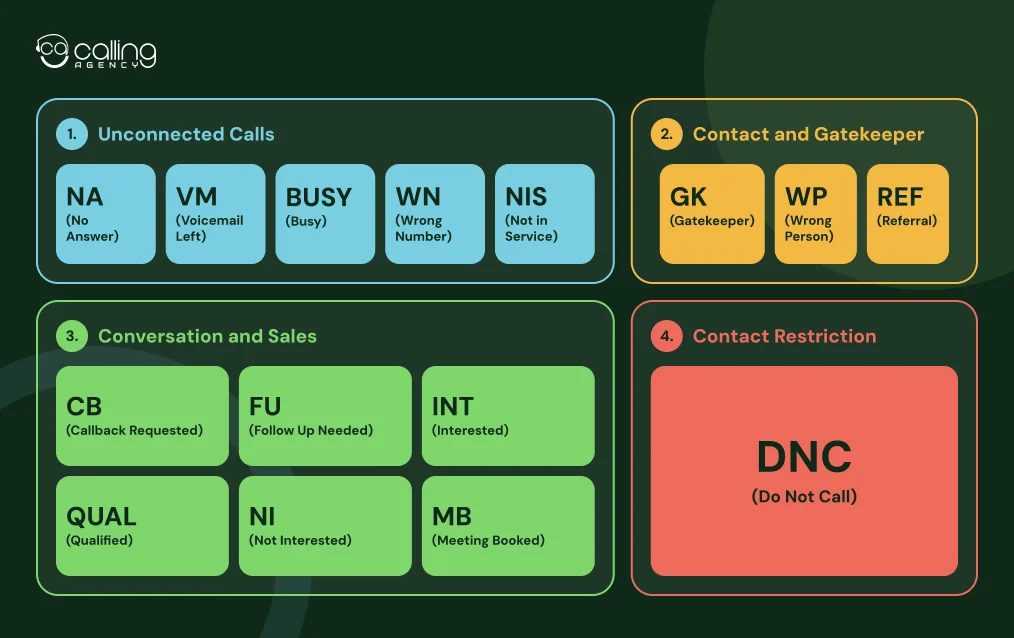
Unconnected Call Outcomes
| Code | Disposition | When to use it | Required note | Next action |
| NA | No Answer | The call rang, but nobody answered. | Optional | Retry under your call cadence. |
| VM | Voicemail Left | The call reached voicemail and the rep left a message. | Optional | Continue the approved follow up cadence. |
| BUSY | Busy | The line returned a busy signal. | Optional | Retry later under your calling rules. |
| WN | Wrong Number | The number belongs to another person or business. | Correct number, if provided | Correct or suppress the bad number. |
| NIS | Not in Service | The carrier says the number is disconnected or not in service. | Error message, if useful | Verify another number. |
Contact and Gatekeeper Outcomes
| Code | Disposition | When to use it | Required note | Next action |
| GK | Gatekeeper | A receptionist, assistant or colleague answers but does not transfer the call. | Name, role or transfer guidance, when available | Try a suitable route to the decision maker. |
| WP | Wrong Person | A person answers, but they are not the intended contact. | Correct contact or referral, if available | Update the contact record. |
| REF | Referral | The contact shares a better person or department to approach. | Referral name, role and contact details | Create or update the referred contact. |
Conversation and Sales Outcomes
| Code | Disposition | When to use it | Required note | Next action |
| CB | Callback Requested | The prospect asks for a call at a specific time. | Agreed date, time and time zone | Create a dated callback task. |
| FU | Follow Up Needed | The conversation needs another step, but no callback time was set. | Reason and agreed next step | Assign an owner and due date. |
| INT | Interested | The prospect wants more information or another discussion. | Interest, need and next step | Schedule a follow up or qualification call. |
| QUAL | Qualified | The prospect meets your agreed qualification criteria. | Fit, need, authority and timing, as relevant | Move the lead to the qualified workflow. |
| NI | Not Interested | The prospect declines the offer without requesting any further calls. | Reason, if shared | Close the attempt or use an approved nurture rule. |
| MB | Meeting Booked | The prospect agrees to a scheduled meeting. | Date, time, attendees and meeting purpose | Create the calendar event and send confirmation. |
Contact Restriction
| Code | Disposition | When to use it | Required note | Next action |
| DNC | Do Not Call | The person asks your business not to call again. | Request date and relevant details | Record the opt out and suppress future calls. |
Teams with longer sales cycles may add Disqualified or Nurture. Add Meeting Confirmed, Rescheduled or ‘No Show’ outcomes especially in B2B sales calls to track post booking outcomes.
Use Disconnected Number as a separate code when reporting needs it. Keep sales stage outcomes separate from call results.
A code should describe the call rather than the rep’s opinion. Use Interested only after the prospect signals interest. A positive conversation alone does not make a lead Qualified.
Treat DNC as a contact suppression status on the record as well as a call outcome. In accordance with 47 CFR § 64.1200(d)(3), whenever a covered US telemarketing call request from a residential subscriber is made, it shall be recorded and integrated into your own internal Do Not Call.
The company making the calls is responsible for honoring Do Not Call requests. Even if another company keeps the list. Add each requested number to your company’s internal Do Not Call list right away to prevent future calls.
Audience specific rules apply as well as rules for different kinds of calls and call locations. Review the requirements for your campaign in the FTC’s Telemarketing Sales Rule guidance.
How to Choose the Right Call Disposition Code
Use the call result instead of the sales stage, to select a disposition. These rules help reps classify similar outcomes.
| Situation | Use | Do not use |
| The phone rings without an answer. | No Answer | Busy |
| A voicemail greeting plays and the rep leaves a message. | Voicemail Left | No Answer |
| A receptionist answers but cannot transfer the call. | Gatekeeper | Wrong Person |
| A person answers and says a different employee handles the service. | Wrong Person or Referral | Wrong Number |
| The prospect asks for a call next Tuesday at 10 a.m. | Callback Requested | Follow Up Needed |
| The prospect says “send details” but gives no callback time. | Follow Up Needed | Callback Requested |
| The prospect likes the offer but does not meet your qualification rules yet. | Interested | Qualified |
| The prospect declines the offer. | Not Interested | Do Not Call |
| The prospect asks you to stop calling. | Do Not Call | Not Interested |
A gatekeeper is a person and not a failed number. Record the name and routing detail.
“Wrong Number” means call is not going to the intended person or business. And “Wrong Person” means the number is valid yet you need to update the contact record.
When the prospect accepts a specific time, use Call Back Requested. Follow Up Needed is for when the rep needs to send material. Or verify information but do not have a set callback time.
Keep Interested separate from Qualified. Qualification requires checking the lead against standard lead qualification criteria. It can be business fit, need, authority, budget and timing.
Call Disposition vs. Lead Status vs. Call Notes
These are specifically different types of fields. Keep the two close together. But never place one in the other to separate an individual call from the sales relationship.
| Field | What it records | Example |
| Call disposition | The result of one call attempt | No Answer |
| Lead status | The prospect’s current position in your sales process | New, Working, Qualified or Disqualified |
| Call notes | Context from the conversation | Asked for pricing by email and a call Friday |
Multiple call dispositions can be attached to a prospect while in one sales pipeline status. For instance, a prospect could get three sets of call dispositions like No Answer, Voicemail Left and Callback Requested. Lead qualification is used to determine the point when a Working lead goes Qualified.
Call notes add context, but they should not replace a disposition. Notes are free text, so reporting every outcome from notes alone becomes difficult. Use a dropdown for the disposition and a notes field for details.
How to Set Up Call Disposition Codes in Your CRM
Set calling rules prior to configuring software. A copied list can create confusing reports.
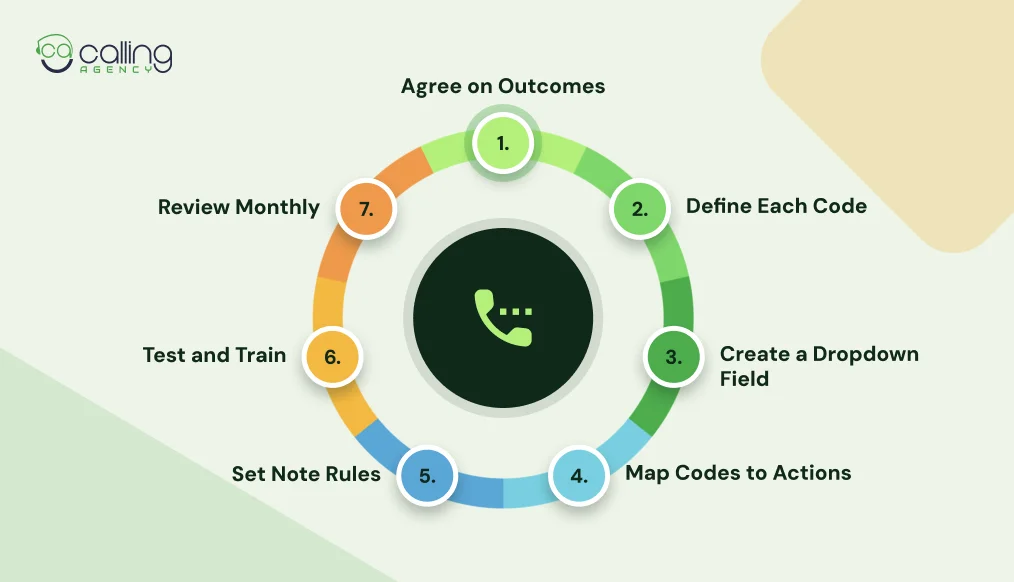
- Agree on outcomes. Review recent calls with SDRs and sales managers. Remove duplicate or rarely useful labels.
- Define each code. Explain when reps should select it and when another code fits better. Include examples for Gatekeeper, Wrong Person, Callback Requested and Do Not Call.
- Create a dropdown field. Add the list as a CRM field in your dialer or call logging tool. Salesforce has a CallDisposition object for results selected by sales reps.
- Map each code to an action. No Answer may schedule another attempt. Callback Requested should create a dated task. Meeting Booked should create a meeting record. Do Not Call should update suppression controls.
- Set note requirements. Require callback times, meeting details and useful contact corrections. Avoid long notes for simple outcomes.
- Test and train. Ask reps to classify sample calls. Resolve unclear definitions, then train the team to log calls and complete tasks.
- Review monthly. Check code use and retire labels with little value.
An AI dialer may also log answering machine detection, IVR or carrier errors. Keep system statuses separate from rep selected sales call dispositions.
If you’re planning to hire cold callers through an agency, get this clarified on disposition fields and suppression before launching your first campaign.
How to Use Call Disposition Codes to Track Sales Performance
Call disposition codes turn logs into sales activity data. View results by rep, campaign, source and time frame. Track performance, cadence and follow up task completion through campaign reports, sales reports and call analytics.
Use consistent definitions for each metric:
| Metric | Calculation | What it helps you review |
| Connect rate | Calls answered by a person ÷ total dials × 100 | How often calls reach someone |
| Decision maker conversation rate | Conversations with the intended contact ÷ total dials × 100 | How often reps reach the target contact |
| Meeting conversion rate | Meetings booked ÷ conversations with the intended contact × 100 | How often target conversations create meetings |
| Wrong number rate | Wrong Number outcomes ÷ total dials × 100 | Accuracy of contact data |
| Callback completion rate | Callbacks completed by the due time ÷ callbacks due × 100 | Follow up reliability |
Set each denominator and then compare teams. Some reports count a gatekeeper as a connection. Others count only conversations with the intended contact. Keep both measures separate. Then use gatekeeper interactions to identify opportunities to reach the decision maker.
Review patterns before judging reps. A high Wrong Number rate may point to poor data. A low decision maker conversation rate may point to list quality, call timing or gatekeeper access. A low callback completion rate may point to task ownership. Review meeting quality alongside volume and check notes or recordings.
Best Practices for Managing Cold Calling Disposition Codes
At CallingAgency, we keep our disposition lists simple so reps can use them during their live calls.
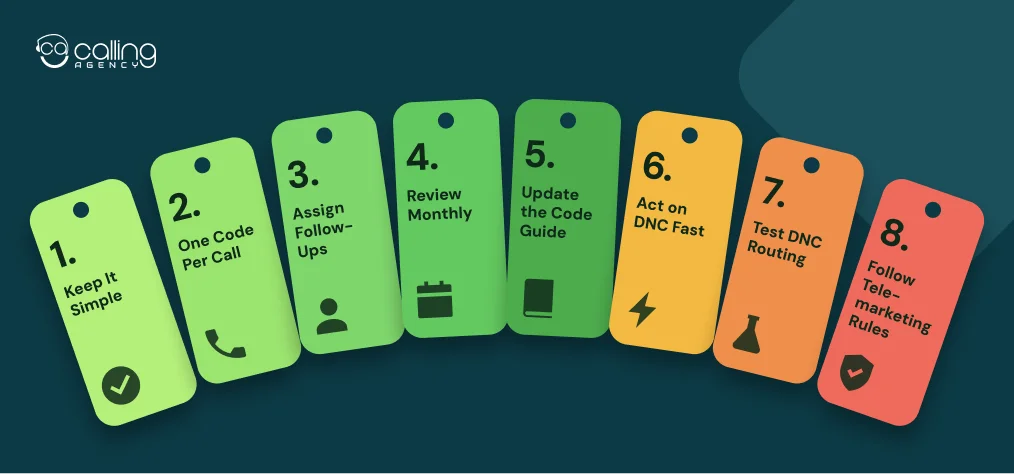
- Keep it simple. Add a code only if it helps your team measure results or plan follow ups. Because too many options will overload your staff’s brain with confusion.
- Use single disposition code for each call. If you’ve got interest level, budget or referral source info then make comments for note.
- Assign follow up steps. For each lead with follow up requirement, assign an owner, a date and a task.
- Review your data on monthly basis. Watch for missing dispositions, duplicate codes or overuse of “Other” as a code.
- Update the code guide. Remove the codes your team has stopped using and explain the new ones to your reps.
- Handle Do Not Call requests quickly. Add those numbers to your company’s blocking list and DOUBLE CHECK it before you launch your next campaign.
- Run a test. Make sure those Do Not Call requests make it to the correct lists. Especially if an agency is calling for you.
- Follow telemarketing rules. For covered US consumer telemarketing, FTC rules require written Do Not Call procedures, staff training and company specific list.
Most B2B calls are excluded from FTC Do Not Call rules. But exceptions can apply. FCC rules may also apply based on the number and calling method.
FAQs About Call Disposition Codes
How many call disposition codes should a sales team use?
Sales team should use enough codes to show the difference between call outcomes and next step guide. This list has 14 codes. With fewer codes, reps may group different results like Wrong Contact and Bad Number. Too many codes can confuse reps and lead to inconsistent choices. Review your list every quarter. Remove codes your team rarely uses.
What is the difference between call disposition and lead status?
A disposition describes one call, such as Voicemail Left. Lead status describes the prospect’s current sales stage, such as Working or Qualified. One lead can have several dispositions over time.
Should voicemail count as a connected call?
No. A voicemail is not a live connection because the rep did not speak with a person. Track voicemails separately from the connect rate so they do not inflate the number of live conversations.
What disposition should reps use for a gatekeeper?
Use Gatekeeper when an assistant or receptionist answers but does not ring through. Record the person’s name, job title and instructions for transfer.
Can a rep pick more than one code per call?
Some CRMs allow multiple tags, but use one primary disposition per call for consistent reporting. Record extra details in call notes or secondary fields. Choose the disposition that best describes the call’s final outcome.
Who updates the DNC list after the code?
Your system should update the Do Not Call list as soon as a rep selects the code. This removes the need for reps to remember each request. If an agency makes calls for you, add the number to both your company’s list and the agency’s list. Test the sync during the first week of every campaign.
Can a team customize call disposition codes in its CRM?
Some CRMs and dialers have custom result fields (custom dispositions). We recommend calling your provider.
What is the difference between call status and call disposition?
Call status often describes a technical result like busy or unanswered. A custom disposition records a sales outcome like Interested or Callback Requested. Define both fields.